The best construction management software should solve the parts of project delivery that create the most friction for your business. That could mean controlling project costs, coordinating RFIs and drawings, managing site activity, scheduling residential work or connecting construction accounting with operations.
There is no single feature set that every contractor needs. Construction platforms range from broad systems to more focused software like LiveCosts for financial control, field management, construction accounting or residential construction.
This guide compares six construction management platforms based on what they actually manage and where they fit within a construction business.
Quick Summary
Construction management software can cover five main areas:
Project management: schedules, tasks, RFIs, submittals and documents.
Field management: site tasks, drawings, inspections, forms and progress reporting.
Financial management: budgets, job costing, committed costs, labour, forecasting and profitability.
Procurement: supplier purchasing, purchase orders, approvals and deliveries.
Business management: accounting, payroll, customer management and reporting.
The right software depends on which of these areas you need to improve.
See Our Top Picks
| Software | What it does |
| LiveCosts | Focuses on construction financial management and project cost control. It tracks budget, actual and committed costs, procurement, labour, invoices, WIP, CVR, forecasting, and profitability around each project. |
| Procore | Combines construction project management and field coordination. It covers RFIs, submittals, drawings, schedules, commitments, and estimation. |
| Autodesk Construction Cloud | Combines construction project management with BIM and document coordination. It covers document control, BIM coordination, field workflows, and cost management. |
Manage job costs, labour, POs and spending in real time without heavy setup or long training.
Why Trust LiveCosts?
LiveCosts works directly with construction companies that need better control over project costs, budgets, procurement, WIP, CVR, and profitability.
Our experience comes from solving the financial challenges contractors face during live projects—from tracking purchase commitments and supplier invoices to understanding cost variance and protecting project margins.
This gives LiveCosts a practical perspective on what construction management software needs to deliver, particularly for contractors where financial control is as important as project coordination.
Our comparisons consider where each platform is strongest rather than assuming one system is the best fit for every contractor. LiveCosts is included where its focus on construction financial management and project cost control matches the needs being evaluated.
Best Construction Management Software Compared
| Feature | LiveCosts | Procore | Autodesk | Buildertrend | Fieldwire | Sage Construction |
| Project budgeting | Budget, actual and committed costs | Yes | Yes | Yes | Budget tools | Yes |
| Job costing | Detailed project and cost code tracking | Yes | Cost management | Yes | Limited | Yes |
| Cost codes | Project, phase and cost code allocation | Yes | Yes | Yes | Limited | Yes |
| Committed costs | POs and commitments before invoice | Yes | Yes | Yes | Limited | Yes |
| Purchase orders | RFQ, PO, approvals and deliveries | Yes | Cost workflows | Yes | Limited | Yes |
| Labour tracking | Timesheets, rates, projects and cost codes | Yes | Field labour data | Yes | Time tracking | Yes |
| Invoice management | OCR, approvals and three way matching | Yes | Cost workflows | Yes | No core focus | Yes |
| WIP and CVR | WIP, CVR and project profitability | Financial reporting | Cost reporting | Financial reporting | Limited | WIP |
| Forecasting | Cost to complete and cash flow visibility | Yes | Yes | Financial tools | Limited | Yes |
| Scheduling | Not a core function | Yes | Yes | Yes | Yes | Available across Sage suite |
| RFIs | Not a core function | Yes | Yes | Yes | Yes | Varies by product |
| Drawing management | Not a core function | Yes | Yes | Yes | Yes | Varies by product |
| Site reporting | Cost and labour focused | Yes | Yes | Yes | Yes | Yes |
| Client management | Not a core function | Limited | Limited | Yes | No core focus | Varies |
| Accounting | Xero, QuickBooks and Sage integration | Integrations | Integrations | Integrations | Integrations | Construction accounting |
Capabilities vary by product, module and plan. The table shows the main focus of each platform rather than every available feature.
1. LiveCosts
LiveCosts focuses on the financial side of construction management. It helps contractors understand what each project is costing while work remains active.
Instead of spreading project financial data across budgets, spreadsheets, purchase orders, timesheets, invoices and accounting exports, LiveCosts connects these records around the same project cost position.
Project Cost Control
LiveCosts tracks budgeted, actual, and committed costs by project, phase, and cost code.
LiveCosts helps contractors:
- Compare project budgets with actual costs
- Include committed costs when reviewing project spend
- Identify cost variances by cost code
- Monitor costs before all supplier invoices arrive
The same project cost data can support budget vs actual reporting, WIP, CVR, and project profitability reporting.
Procurement and Purchase Orders
LiveCosts connects procurement and purchase orders with project budgets.
Teams can use LiveCosts to:
- Manage purchase requests
- Compare supplier quotations
- Raise and approve purchase orders
- Record project deliveries
- Raiser purchase orders
- Track POs against budget
- Allocate purchases to projects and cost codes
Approved purchase orders contribute to committed project costs before the supplier invoice arrives.
This gives contractors earlier visibility into project cost exposure and helps teams avoid placing additional orders against budgets that are already committed.
Labour Cost Tracking
LiveCosts allows teams to record labour against projects and cost codes using mobile timesheets.
Labour rates contribute to project costs alongside:
- Materials
- Subcontractors
- Plant
- Equipment
- Other project expenses
This allows contractors to compare labour costs with project budgets without maintaining a separate labour-cost spreadsheet.
Supplier Invoice Management
LiveCosts connects supplier invoices with the purchasing process.
Its invoice workflow includes:
- Invoice data extraction
- Purchase order matching
- Delivery matching
- Three-way matching
- Invoice approval
- Transfer of approved financial records to the accounting system
Teams can identify discrepancies before approving an invoice.
This maintains a clearer financial trail from purchase commitment to final supplier invoice and prevents budget overruns.
WIP and CVR
LiveCosts supports work in progress (WIP) and Cost Value Reconciliation (CVR) using current project financial data.
Commercial and finance teams can review:
- Actual project costs
- Committed costs
- Project value
- Budget variance
- Project profitability
This gives teams a more current view of project financial performance during commercial reviews.
Forecasting and Profitability
LiveCosts helps contractors assess where project costs and margins are heading, rather than relying only on historical expenditure.
Project teams can use current cost and commitment data to:
- Review budget variance
- Monitor expected project costs
- Identify potential overruns
- Track project profitability
- Assess the expected final margin
Earlier visibility gives contractors more time to investigate financial issues while a project is still underway.
Accounting Integrations
LiveCosts integrates with Xero, QuickBooks, and Sage.
LiveCosts connects project-level financial workflows with accounting rather than attempting to replace the contractor’s accounting system.
Its role focuses on:
- Project costs
- Procurement
- Purchase orders
- Labour costs
- Supplier invoices
- Financial reporting
LiveCosts is therefore most relevant when a contractor’s main construction management challenge is financial visibility and cost control.
It is not positioned as a replacement for specialist software used for drawing management, RFIs, or detailed construction scheduling.
2. Procore
For broad construction project management
Procore combines project coordination, field management and project financials within a wider construction platform.
Its project management tools cover RFIs, submittals, drawings, documents and schedules. Field teams can also access project information, record daily activity and work from current drawings.
Procore also provides significant financial functionality. Teams can connect field production data with budgets, track labour and commitments, manage changes and sync job costs with accounting systems.
This broad scope makes Procore different from specialist tools that concentrate on one part of construction management.
Key capabilities
- RFIs and submittals
- Drawings and documents
- Scheduling
- Field management
- Budgets and commitments
- Change management
- Project financials
Compare Procore with LiveCosts
3. Autodesk Construction Cloud
For design, BIM and project coordination
Autodesk Construction Cloud, which Autodesk now positions within Autodesk Forma, connects design and construction information across the project lifecycle.
Its document management tools centralise project documents, while model coordination helps teams identify design clashes before they create problems on site.
Project management functionality includes RFIs, submittals, schedules, meetings, issues, forms and field workflows. Autodesk also provides cost management for budgets, commitments, change orders and forecasting.
Its strongest distinction in this comparison comes from connecting construction management with Autodesk’s wider design and BIM environment.
Key capabilities
- BIM and model coordination
- Drawing and document management
- RFIs and submittals
- Site forms and issues
- Project schedules
- Budget and cost management
4. Buildertrend
For residential construction management
Buildertrend approaches construction management around the workflows of home builders and remodelers.
The platform combines project schedules, budgeting, client communication, change management and other residential construction workflows. Current 2026 comparisons consistently distinguish Buildertrend through its residential and homeowner-focused capabilities.
This matters because residential contractors often manage more customer interaction than commercial project teams. Selections, approvals, project updates and changes can form a significant part of the workflow alongside schedules and project costs.
Its financial tools also extend into estimates, budgets and job costing.
Key capabilities
- Project scheduling
- Residential job management
- Client communication
- Selections and changes
- Budgeting
- Job costing
5. Fieldwire
For field and site management
Fieldwire focuses heavily on the work taking place on site.
Teams can access current plans, assign tasks, track progress, complete inspections and punch lists, and record information through forms and reports.
Its drawing tools allow field teams to view plans, add markups and compare versions. Fieldwire also provides RFIs, submittals, documents and change order workflows, so its scope now extends beyond basic task management.
The platform remains particularly relevant where the main problem is connecting site teams with current project information.
Key capabilities
- Site task management
- Plans and markups
- Inspections
- Punch lists
- Forms and reports
- RFIs and submittals
6. Sage Construction
For construction accounting and financial management
Sage approaches construction management from a strong accounting and financial foundation.
Its construction suite covers job costing, budgeting, purchase orders, payroll, WIP and financial reporting. Sage also offers project management, estimating and operational tools across its wider construction product range.
Its job costing tools can track labour, materials, equipment and subcontract costs and compare budgets with actual expenditure. Sage also supports committed cost tracking and automated WIP reporting in relevant construction products.
Sage offers several construction products, so contractors should assess the specific product and regional configuration rather than treating Sage as one standard application.
Key capabilities
- Construction accounting
- Job costing
- Budgets and committed costs
- Payroll
- Purchase orders
- WIP and financial reporting
Compare Sage with LiveCosts
Manage job costs, labour, POs and spending in real time without heavy setup or long training.
Which Type of Construction Management Software Do You Need?
The number of features matters less than whether those features solve the problem your team faces.
Project Cost and Financial Control
If the main challenge is understanding what projects are costing, prioritise:
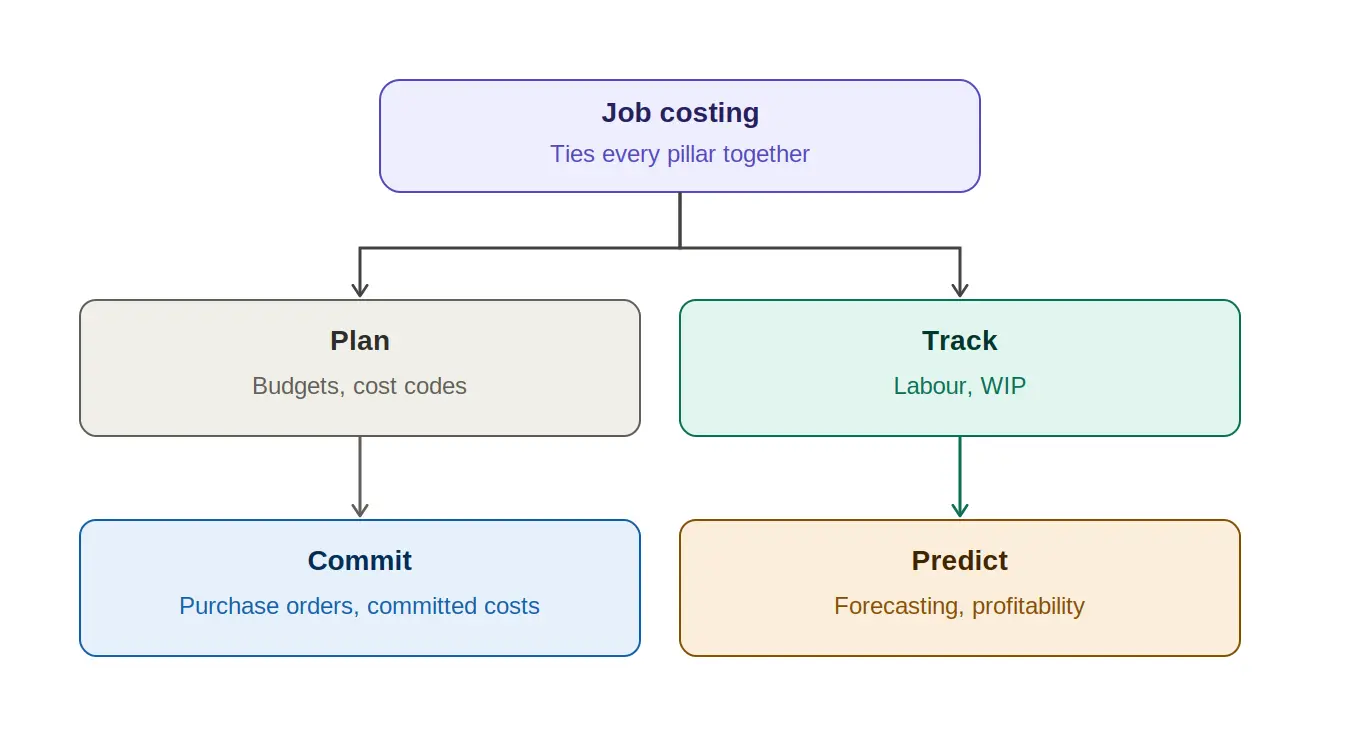
This points towards construction financial management and cost control software.
Project Planning and Coordination
If projects struggle with information moving between office and site teams, look for:
- Plan schedules and key milestones
- Assign and track tasks
- Manage RFIs and responses
- Handle submittals and reviews
- Keep project documents organised
- Streamline approvals
- Centralise project communication
Broad construction project management platforms focus heavily on these workflows.
Field and Site Management
Site focused teams may need:
- Access the latest drawings
- Assign and update tasks
- Complete inspections and forms
- Manage punch lists
- Capture site photos
- Report progress from the field
In this case, ease of use on site matters as much as the size of the feature list.
BIM and Design Coordination
Projects with complex design information may prioritise:
- View and coordinate BIM models
- Manage drawings in one place
- Detect and resolve design clashes
- Track revisions and design changes
- Keep project documents organised and controlled
These requirements point towards BIM and design coordination platforms rather than financial management software.
Residential Construction
Home builders and remodelers often need:
- Plan schedules and project milestones
- Keep clients informed
- Manage selections and approvals
- Track changes and variations
- Create and update estimates
- Monitor project budgets
Residential construction platforms combine project delivery with homeowner workflows.
Construction Accounting
Finance led requirements centre on:
- Manage day-to-day construction accounts
- Process accounts payable
- Handle payroll
- Track costs by job
- Monitor work in progress (WIP)
- Produce accurate financial reports
A construction accounting system may make more sense when these functions need to sit within the financial system of record.
Why Choose LiveCosts for Construction Financial Management?
Construction projects create financial information long before the accounts show the final cost.
A site order creates a commitment. Labour adds cost as work progresses. A delivery confirms what arrived. A supplier invoice turns part of the commitment into an actual cost. Changes to project value affect the expected margin.
LiveCosts connects these events around the project budget.
Teams can follow the financial path from:
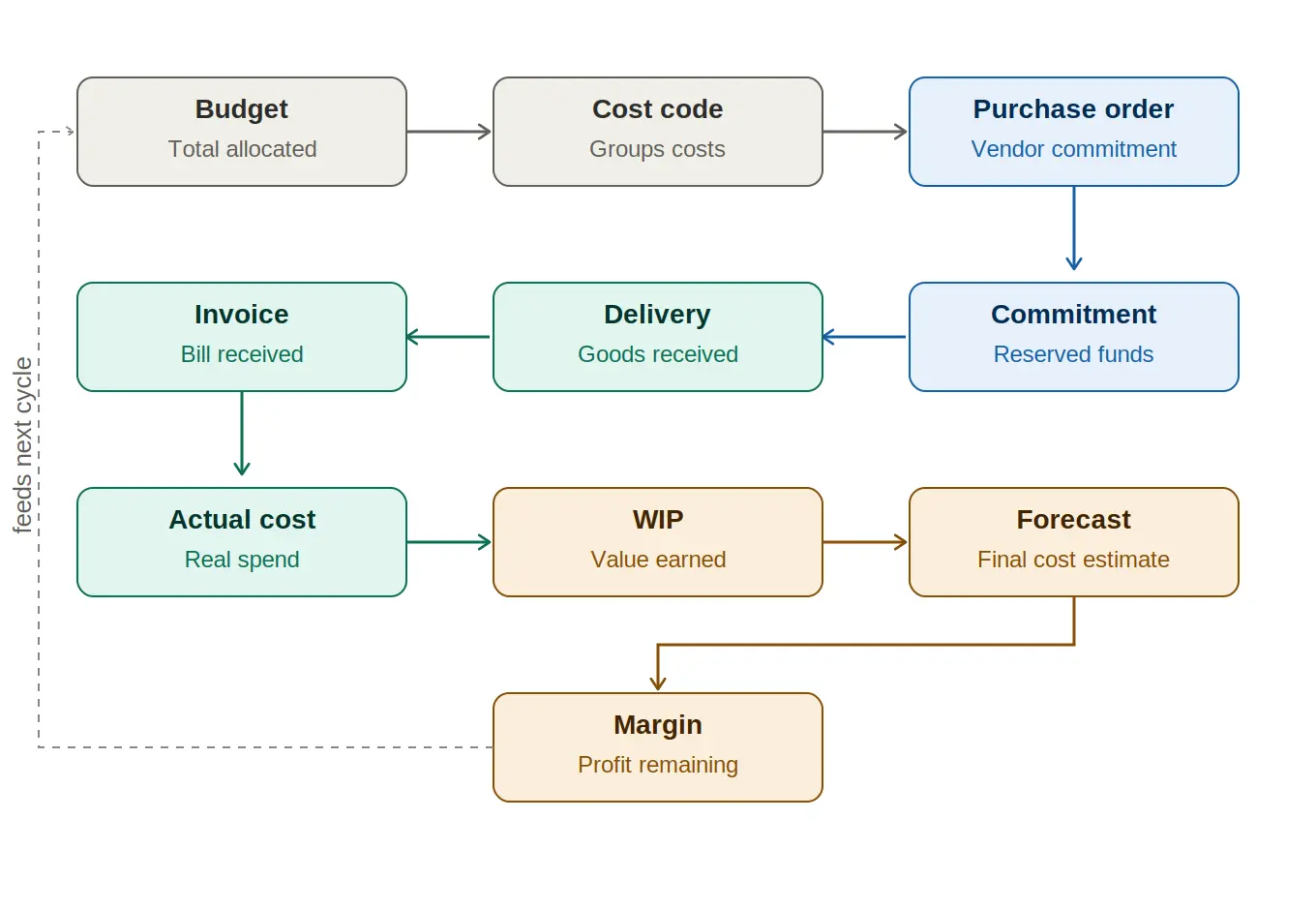
This gives project, commercial, procurement and finance teams a shared view of project costs while work remains active. LiveCosts also connects this project cost workflow with Xero, QuickBooks and Sage rather than trying to replace the accounting ledger.
For contractors whose main construction management challenge is controlling project costs, procurement and financial performance, this provides a more focused approach than implementing a broader platform primarily for drawings, RFIs or scheduling.
Frequently Asked Questions
What does construction management software manage?
It can manage tasks, drawings, documents, subcontractors, budgets, job costs, purchase orders and project reporting. Individual platforms provide different levels of functionality across these areas.
What construction software is best for mid-sized contractors?
Mid-sized contractors often benefit from focused software that addresses their main problem without adding unnecessary complexity. Consider project costing, PO management and accounting requirements before comparing platforms.
Can construction management software integrate with Xero or QuickBooks?
Yes. Many construction platforms integrate with Xero or QuickBooks to connect project activity with accounting records and reduce duplicate data entry.
Is construction management software suitable for subcontractors?
Yes. Subcontractors can use it to manage areas such as project costs, labour, purchasing, site records and progress across multiple jobs.
Can construction management software replace Excel?
It can replace many spreadsheets used for project budgets, cost tracking, purchasing, schedules and reporting by keeping project information in a structured system.
What makes construction management software differ from ERP?
Construction management software focuses on construction projects and operational workflows. ERP systems typically cover broader company functions such as finance, payroll, HR and resource management.
Is cloud-based construction management software better?
Cloud software gives office and site teams access to current project information from different locations. The right choice still depends on security, connectivity and workflow requirements.